

Introduction
Conversion tracking is the process of measuring the actions users take on your website after interacting with your ads or marketing campaigns, and understanding how to set up conversion tracking properly is essential for accurate results. These actions, known as conversions, can include purchases, form submissions, sign-ups, downloads, or phone calls. In simple terms, it helps you understand what happens after a user clicks on your ad or visits your website. Without conversion tracking, you cannot clearly see which marketing efforts are actually bringing results and which are not.
For businesses, marketers, and advertisers, conversion tracking is very important because it helps improve decision-making and increase return on investment (ROI). It allows you to identify which campaigns are performing well and optimize those that are not. Common platforms used for this purpose include Google Ads, Google Analytics, websites, and Google Tag Manager (GTM). This conversion tracking setup guide will help you understand how to properly set up tracking and make your marketing more effective and data-driven.
What is Conversion Tracking?
Conversion tracking is a method used to measure and record the actions users take after interacting with your website, ads, or marketing campaigns. These actions show whether your marketing efforts are successful in achieving business goals. In simple terms, it helps you understand what users do after they click on your ad or visit your website, allowing you to evaluate performance more accurately.
Examples of conversions include purchases made on an online store, form submissions for inquiries or leads, phone calls from potential customers, and sign-ups for newsletters or services. Each of these actions represents a valuable outcome that can contribute to business growth.
Tracking these conversions is important because it directly impacts ROI (Return on Investment) and marketing decisions. By knowing which campaigns generate the most conversions, businesses can focus their budget on high-performing strategies, reduce wasted ad spend, and improve overall campaign effectiveness.
Why Conversion Tracking is Important
Conversion tracking plays a key role in improving overall marketing performance because it shows exactly which ads, keywords, or campaigns are generating real results. When you understand what works, you can optimize your ads for better performance, increase click-through rates, and reduce wasted spending on ineffective strategies.
It is also essential for measuring ROI (Return on Investment), as it clearly connects marketing efforts with actual business outcomes like sales or leads. This helps marketers make smarter decisions and continuously refine their campaigns for better results. With proper tracking, you can optimize marketing campaigns by focusing on high-performing channels and improving weak areas. It also supports better decision-making by providing accurate data instead of assumptions. Many businesses search for solutions like how to track conversions on website because understanding user actions is critical for long-term growth and success.
Types of Conversion Tracking
Website Conversions
Website conversions refer to the actions users take directly on your website. These are the most common types of conversions and include activities such as making a purchase, filling out a contact form, subscribing to a newsletter, or clicking on important buttons. Tracking these actions helps you understand how effectively your website turns visitors into customers or leads.
Google Ads Conversions
Google Ads conversions focus on measuring the performance of your paid advertising campaigns. This type of tracking shows what happens after a user clicks on your Google ad, such as completing a purchase or submitting a form. It helps advertisers determine which ads are generating real business results and which need improvement.
Google Analytics Conversions
Google Analytics conversions involve tracking user behavior through goals and events. It provides detailed insights into how users interact with your website, including page views, session duration, and specific actions. This helps you understand user journeys and optimize your website performance.
Offline Conversions
Offline conversions track actions that happen outside your website, such as phone sales, in-store purchases, or direct customer interactions. These conversions are later linked back to your online marketing efforts to measure true campaign effectiveness.
How to Set Up Conversion Tracking (Step-by-Step Guide)
Setting up conversion tracking correctly is essential if you want to measure the real performance of your marketing campaigns. This step-by-step guide will help you implement tracking using the most common tools like Google Analytics, Google Ads, and Google Tag Manager.
Step 1: Define Your Conversion Goals
Start by identifying what actions matter most for your business. These could be purchases, form submissions, sign-ups, phone calls, or downloads. Clear goals help you track meaningful data instead of random user activity.
Step 2: Set Up Google Analytics Conversion Tracking
In Google Analytics 4 (GA4), conversions are tracked using events. First, make sure your website is connected to GA4. Then, mark important events (like “purchase” or “submit_form”) as conversions. This helps you understand user behavior and website performance.
Step 3: Set Up Google Ads Conversion Tracking
In Google Ads, create a conversion action based on your business goal. After that, install the tracking tag on your website or use Google Tag Manager to simplify the process. This allows you to measure which ads are generating leads or sales.
Step 4: Install Google Tag Manager (Recommended)
Google Tag Manager (GTM) makes conversion tracking easier without editing code repeatedly. You just add tags, triggers, and variables inside GTM to manage all tracking in one place. It is highly recommended for accurate and flexible tracking setups.
Step 5: Test Your Tracking Setup
Before going live, always test your conversion tracking. Use tools like Google Tag Assistant or real-time reports in GA4 to confirm that conversions are being recorded correctly. Fix any issues before running full campaigns to ensure accurate data collection.
Conversion Tracking Using Google Tag Manager
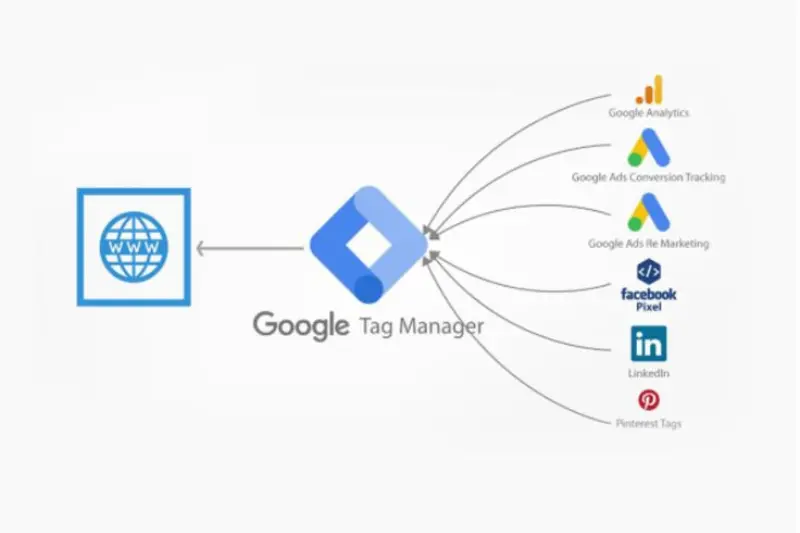
Google Tag Manager (GTM) is one of the most powerful tools for managing and deploying conversion tracking without directly editing website code. It allows you to control all your tracking tags in one place, making the process faster, more flexible, and less error-prone.
Creating Tags, Triggers, and Variables
In GTM, tags are snippets of code used for tracking (such as Google Analytics or Google Ads tags). Triggers define when a tag should fire, for example when a user submits a form or clicks a button. Variables store dynamic values like page URL, click text, or transaction value. Together, these three components form the foundation of any tracking setup.
Setting Up Event Tracking
Event tracking in GTM allows you to monitor specific user interactions on your website. For example, you can track button clicks, form submissions, video views, or downloads. You simply create a trigger for the action, attach it to a tag, and send the data to Google Analytics or Google Ads.
Linking GTM with Google Analytics & Google Ads
To complete your setup, you need to connect GTM with both Google Analytics and Google Ads. This is done by adding the respective tracking IDs and configuring tags inside GTM. Once linked, all conversion data flows automatically into your analytics and advertising platforms, giving you a complete view of user behavior and campaign performance.
You may also read this:
👉 Analytics Vidhya Blog – Data Science, AI & Analytics Learning Hub
👉Ultimate Guide to Blog Setup – Step-by-Step SEO Blog Creation (Search Atlas)
👉 The 13 Best Marketing Blogs to Follow (Ahrefs Guide)
👉 Insights – Data Science Blogs Category (DASCA World of Data Science)
Common Mistakes in Conversion Tracking Setup
Setting up conversion tracking correctly is crucial, but many marketers make small mistakes that lead to inaccurate data and poor decision-making. These errors can affect how you measure performance across Google Ads, Google Analytics, and your website.
Incorrect Tag Placement
One of the most common issues is placing tracking tags in the wrong part of the website or not firing them correctly. If tags are not installed properly, conversions may not be recorded at all or may trigger inconsistently, leading to unreliable data.
Not Linking Accounts
Another frequent mistake is failing to link Google Ads, Google Analytics, and Google Tag Manager. When accounts are not connected, data becomes fragmented, and you lose the ability to track the full user journey from click to conversion.
Double Tracking Conversions
Sometimes the same conversion is recorded multiple times due to duplicate tags or incorrect configuration in GTM or GA4. This can inflate results and give a false impression of campaign performance.
Missing Event Configuration
Many users forget to properly set up event tracking for key actions like form submissions or purchases. Without correct event configuration, important conversions are not captured, making it difficult to analyze real user behavior and optimize campaigns effectively.
Best Practices for Accurate Conversion Tracking
Always Test Before Launching Campaigns
Before running any marketing campaign, it is important to thoroughly test your conversion tracking setup. Use tools like Google Tag Assistant or GA4 real-time reports to ensure that every tag, trigger, and event is firing correctly. This helps you avoid missing or incorrect data once the campaign goes live.
Use Consistent Naming Conventions
Keeping a consistent naming structure for events, tags, and conversions makes your tracking system easier to manage and understand. For example, using clear names like “form_submit_contact” or “purchase_completed” helps you quickly identify actions in Google Analytics or Google Ads without confusion.
Track Micro and Macro Conversions
Don’t only focus on final sales or leads (macro conversions). Also track micro conversions such as button clicks, add-to-cart actions, or video views. These smaller actions help you understand user behavior and improve the overall conversion funnel.
Regularly Audit Tracking Setup
Over time, websites and campaigns change, which can break or misconfigure tracking. Regular audits ensure that all tags and events are still working correctly. This keeps your data accurate and reliable, helping you make better marketing decisions based on real performance insights.
Tools You Can Use for Conversion Tracking
Google Analytics 4
Google Analytics 4 (GA4) is one of the most powerful tools for conversion tracking. It helps you track user behavior through events such as page views, clicks, form submissions, and purchases. GA4 provides detailed insights into how users interact with your website, making it easier to understand the customer journey and optimize performance.
Google Ads
Google Ads is essential for tracking conversions from paid advertising campaigns. It allows you to measure what happens after a user clicks on your ad, such as making a purchase or submitting a lead form. This helps advertisers evaluate campaign performance and improve return on investment (ROI).
Google Tag Manager
Google Tag Manager (GTM) simplifies the process of managing all your tracking codes in one place. Instead of editing website code repeatedly, you can easily add and update tags, triggers, and variables. It works seamlessly with both Google Analytics and Google Ads for accurate conversion tracking.
Facebook Pixel (Optional)
Facebook Pixel is used to track conversions from Facebook and Instagram ads. It helps businesses understand user actions after interacting with social media campaigns. This is especially useful for retargeting and improving ad performance across Meta platforms.
Conclusion
Conversion tracking is a crucial part of any successful digital marketing strategy because it helps you understand exactly what is working and what is not. By measuring user actions such as purchases, leads, and sign-ups, you can clearly see the performance of your campaigns across platforms like Google Ads, Google Analytics, and Google Tag Manager.
When properly set up, conversion tracking allows you to improve ROI by focusing your budget on high-performing ads and eliminating wasted spend. It also helps you make smarter, data-driven marketing decisions that lead to consistent growth and better results over time.
By following this complete conversion tracking setup guide, you can ensure that every important action on your website is tracked accurately. Whether you are just starting or improving an existing setup, learning how to set up conversion tracking correctly will give you a strong advantage in optimizing your marketing performance.
Frequently asked questions (FAQs)
1. What is conversion tracking in simple words?
Conversion tracking is a method of measuring what users do after clicking your ads or visiting your website, such as purchases, sign-ups, or form submissions.
2. Why is conversion tracking important?
It helps you understand which marketing efforts are working, improves ROI, and allows you to optimize campaigns based on real data instead of guesswork.
3. How to track conversions on a website?
You can track conversions using tools like Google Analytics 4, Google Ads, or Google Tag Manager by setting up events and marking them as conversions.
4. What is the easiest way to set up conversion tracking?
The easiest way is using Google Tag Manager, as it allows you to manage all tracking codes without editing website code directly.
5. What is the difference between Google Ads and Google Analytics conversion tracking?
Google Ads tracks conversions from ads, while Google Analytics tracks overall user behavior and website interactions across all traffic sources.
6. Do I need Google Tag Manager for conversion tracking?
No, but it is highly recommended because it simplifies tracking setup and makes managing tags more flexible and efficient.
7. What are examples of conversions?
Examples include purchases, form submissions, phone calls, email sign-ups, app downloads, and newsletter subscriptions.
8. Can I track offline conversions?
Yes, offline conversions like phone sales or in-store purchases can be tracked by importing data into Google Ads or analytics tools.
9. What is a micro conversion?
A micro conversion is a small user action like clicking a button, watching a video, or adding a product to a cart that leads toward a final conversion.
10. How often should I check my conversion tracking setup?
You should regularly audit your setup, especially after website updates or campaign changes, to ensure all tracking is working correctly.
You may also read this:
👉 The 12 Best Analytics Blogs (Crazy Egg Guide)
👉 Warmforge AI Blog – Email Deliverability & Cold Outreach Insights
👉 How to Tag Blog Posts for SEO – Complete Guide (UsePattern)
👉 Datos Insights Blog – Financial Services & Analytics Research 👉 Blog Analytics Guide: How to Use Data to Improve Your Strategy – HostAdvice
